
I don’t drive much, though these days I drive more than I had for a couple decades. This recent driving has, as I mentioned in a blog post here two years ago (“Message to Self: Lessons, conundrums and opportunities in voice-first EV interfaces”), helped me catch up on the role of audio interfaces in a mode of life that had become unfamiliar to me. As a result of the gap, I leapfrogged right into fairly mature CarPlay, which is Apple’s system that lets your phone become the car’s interface. The experience has been interesting, informative, and sometimes even useful. I’ve managed to come up to speed on various ways that sounds, including voice commands, have gained utility in digitally mediated vehicular activity.
I’ve touched on numerous aspects of this topic in blog posts and my This Week in Sound email newsletter. Throughout, the one thing that really seemed (note the past tense) to be missing, at least for me, was an easy, dependable way to record a voice memo. I won’t go into the details of the benefits of recording voice memos here; if you don’t find voice memos useful, more power to you, and if you do find voice memos useful, then you know what I’m talking about. I will add that with the recent rise of affordable excellent voice-to-text transcriptions (my primary app for this is MacWhisper, though I use the rev.com service on occasion), voice memos are more useful than ever.
As it turned out, CarPlay was (again, note the past tense) really lacking when it came to voice memos. Apple’s iOS operating system even comes with an app literally called Voice Memos (and in a recent update, this app came to include automatic transcription, though I find MacWhisper to be superior), and I use it every day at my desk and when I got for walks. However, unlike Messages and Maps and Podcasts and other such apps — even many non-Apple apps, like YouTube Music and Libby and Hoopla — Apple’s Voice Memos app has zero presence in CarPlay. I’ve mentioned this functional void routinely on social media, and I’ve summed up my frustration and confusion in the article linked to above.
And I’m not alone. A search for variations on “CarPlay voice memo” (and for its Google equivalent, Android Auto) yields numerous online discussions about makeshift fixes, such as leaving yourself a voice mail or texting yourself a voice recording. None of these options, I’ve found, has been particularly useful. The best I’ve been able to do is to use Apple’s Shortcuts feature to create a button on my phone’s home screen and lock screen to record right into the Voice Memos app — which works well, except it means I still have to use my phone, physically, which is not great when you’re driving a car.
And then, out of the blue, a person named David Kellas added a comment to my two-year-old blog post, saying he had gone ahead and made the app himself. “I wanted an app like this for ages,” he wrote in his post, “so built it for everyone to use without any subscription.” And it’s true: the app, which is named Auto Memo Recorder, costs just $1.99, a one-time fee. And it does what it says.
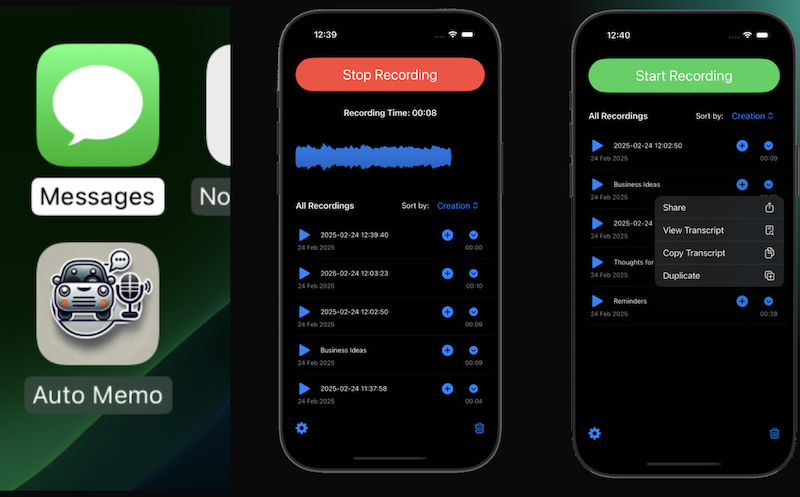
I installed Auto Memo Recorder on my iPhone (an iPhone 13 Pro) and I have been trying it out. It works well. It’s nothing fancy, just pure function. I generally am more of a touchscreen user than a voice-activation user, so my habit so far is to have the app on the home screen, which makes for a two-click or three-click process. I click on the app, and then I click to start recording. The third click is if CarPlay already has an app open (like Maps or Plex or YouTube Music), which actually is most of the time.
Right now, pretty much the only thing that, for my purposes, would improve upon what Auto Memo Recorder offers is for it to sync recordings via iCloud or Dropbox. I’ll keep using it, and I’ll report back on any other observations I have.
Auto Memo Recorder is available through the App Store. More details at invisiblestorm.co.uk/auto-memo. The website mentions “AI enhanced applications,” but the only apparent AI in Auto Memo Recorder is that it will transcribe the voice recording to text. The above image is a screenshot from the app’s website.
Hi Marc,
Really pleased the app has helped already and thank you for putting a post out about it so quickly, really appreciated!
Working on iCloud sync for it next, and you’ll get the update once it comes out!
CarPlay is such an under developed environment for apps in my opinion, I have some more ideas brewing now, and I agree voice memo’s were a function I had been wanting for ages, all too often I find myself driving, needing to note something down and can’t safely!
So two weeks ago I figured…..just build it!
many thanks again
David
I bought the app and I don’t know how to activate it using voice only. No q&a in the app, no instructions
Hi Javier,
When you load into CarPlay there should be a box at the top with the instructions
I cant paste a screenshot in here but it says:
“To begin recording select or say ‘Start Recording’
Voice control is for CarPlay mode to start and stop recording handsfree.
You can also press Start Recording and Stop Recording within CarPlay
Apple provide a link to the Developer website which includes full FAQ and more details:
http://invisiblestorm.co.uk/support
Updates coming soon.
Hope that helps, will look at adding the FAQ into the app itself
cheers
David
I have just come across this app and it is something I have been wanting for months….no….years, so thank you! It works brilliantly.
My plan is to use it for daily journaling, capturing my thoughts on my drive to work. For this, I use Day One. It would be awesome if there was a really easy way to somehow, easily get the voice memos or the transcribed text, into other apps (like Day One) without having to manually copy / paste.
Great work and look forward to future updates.
Good call, will look at export options for transcripts – have had requests for multi-lingual support, so a couple of things to add to the road map!
Apple Watch support went into the last build.
Good call, am looking at export options for transcripts – have also had requests for multi-lingual support, so a couple of things to add to the road map!
Apple Watch support went into the last build.
Another thought, after using the transcribe feature I note that unless I specifically state grammar (eg full stop), the transcribed text is created a one long sentence (no grammar). Is there anything which could be added to make the transcribed text more natural?
As much as I hate subscription models… a bit of investigating of code methods for adding punctuation ends up pointing to the use of 3rd party AI…which might add cost, as on device coding is unpunctuated text. It would need (at the moment) an external parser to attempt human sentence structure recognition in a reasonable fashion.
Maybe possible on device as Apple Intelligence improves….one to revisit.
OMFG! As some Wiseman once said, “I think I love you. “
I’m a regular “think alouder” normally using Just Press Record, which is NOT CarPlay enabled.
So I was very happy to find Auto Memo Recorder when we acquired a car with CarPlay.
There are a couple of minor interface quirks, that I mostly noticed as a developer. Quite often it fails to start recording the first time launched in a given CarPlay drive but is robust when it starts after that. I suspect our MG4 is more likely to blame.
The recordings are pretty good quality but, as of v4.2, tested in Dec 2025, it keeps saying “No speech detected in this recording.” However, on importing those recordings into Evernote, their transcribe feature is able to process them with high accuracy.
I installed. Put it on my carplay apps. Presss and hit start recording. Stops my music but doesnt record and unable to get out of carplay and back to my sony home screen without rebooting my Sony 8500 head unit .
Everthing else on carplay works except this…. I read the developer FAQ but nothing that helped.
Is there some setting im missing?
Sorry to hear that. I’ve only used in a Chevy, also using CarPlay.